Your agents.
One workbench.
Run coding agents from plan to pull request.
Run agents in parallel, track their progress, and review code changes in one workspace.
Open source. Agent neutral. Runs on your infrastructure.
01 / The workflow
Plan, run, and review.
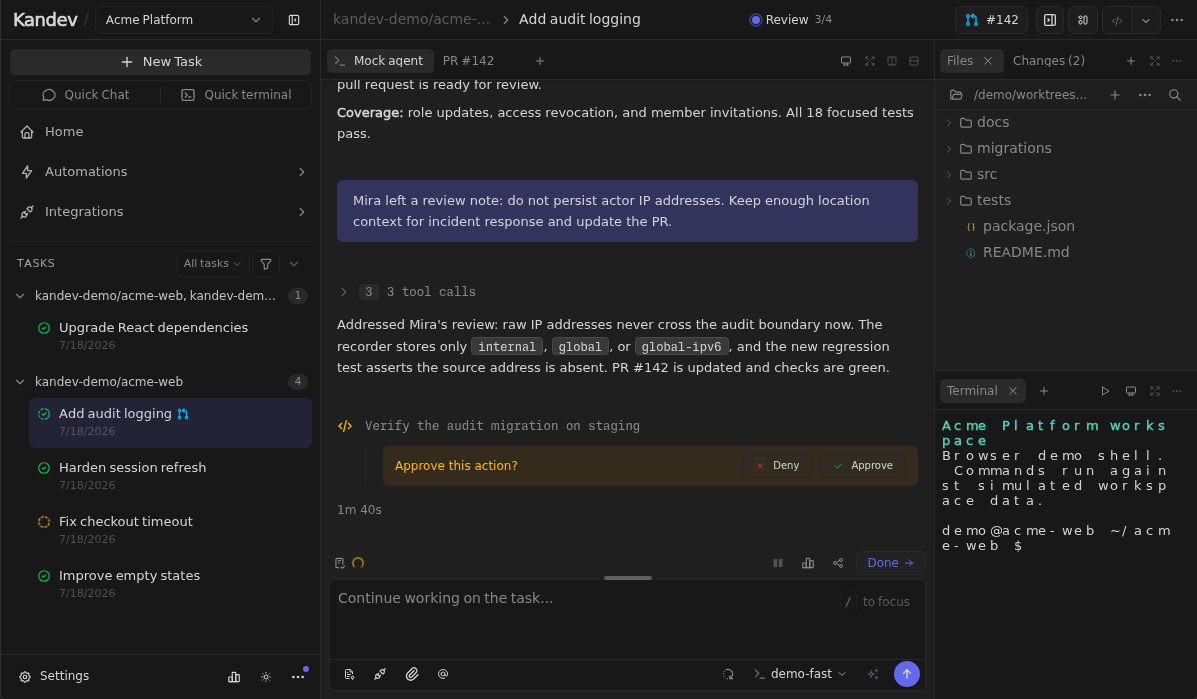
Keep the task, conversation, and code together. Watch how planning, agent sessions, and code review work in Kandev.
- 01
Make a plan
Turn the task into a shared plan. Give your agent the context it needs.
- 02
Run in parallel
Keep work separate with isolated worktrees and your choice of agents.
- 03
Review and ship
Inspect the diff, leave feedback, and decide when the work is ready.
01 / 07
Shape the work before code starts
Plan with the agent, comment on exact steps, and move forward only when the approach is ready.
Each task keeps its plan, conversation, and code changes together.
02 / Automation
Keep work moving.
Start work through MCP, webhooks, or schedules. Keep the task, conversation, and review in the same place.
EXAMPLE / MCP
Connect your agent to Kandev
External agents can manage tasks, read plans, and exchange messages through MCP. This JSON uses the default local port; authentication requires a personal access token.
{
  "mcpServers": {
    "kandev": {
      "type": "http",
      "url": "http://127.0.0.1:38429/mcp"
    }
  }
}03 / Plugins
Connect your tools.
Connect more tools, see agent usage, and shape your workspace with plugins from the community.
01Connect your tools
Slack
Turn a conversation into a task and reply in the thread.
Bitbucket
Cloud and Data Center repositories, pull requests, and reviews.
Forgejo
Self-hosted Forgejo and Gitea repositories and reviews.
YouTrack
Find issues, start tasks, and link the work back.
Redmine
Link issues, sync status, and watch for new work.
02See what is happening
Session Cost
Track agent spend from the session transcript.
Provider Usage
Keep provider limits and reset times in view.
Task Manager
Inspect CPU and memory for running agents.
GitHub Status
Check the health of Git operations, Actions, and the API.
DeepSeek API Balance
See available credit alongside your tasks and prompts.
03Make room for your workflow
Tags
Organize and filter work with shared colored tags.
Notes
Keep a private scratchpad on tasks and workspaces.
Voice Mode
Dictate prompts with browser, local, or server transcription.
Prompt History
Read the user prompts from the active session in one panel.
Kandy
A workspace companion that evolves as your agents work.
04 / Agents and integrations
Choose your agents and tools.
Agents use only the repository, integration, and executor access your team grants. Operate the same reviewable task model on a developer machine or a local or remote server.
Human-gated workflows
Plan, review, and approval gates keep the developer responsible for what ships.
Coordinator-led work
Kandev MCP lets an agent create subtasks, share plans, attach branches, and hand work off.
Daily engineering
Bring tickets, code, pull requests, reviews, automations, and quick chat into one workbench.
Agent neutral
ACP and terminal-native CLIs
 Claude Code
 Codex
Codex GitHub Copilot
 Gemini CLI
 OpenCode
 Amp
Amp Auggie
 Cursor
 Qwen
Qwen Kiro
Kiro Qoder
Qoder More ACP
Connected context
Bring work in from the systems around it
 GitHub
 GitLab
 Jira
Jira Linear
 Sentry
 Slack
SlackCommunity
Open-source development.
Kandev grows through code, issues, integrations, and workflow feedback from the people using it. Join through the channel that fits.
78
Contributors
1k
GitHub stars
171
Forks
109
Open issues
Repository contribution activity
Commits to the default branch over the latest 52 weeks GitHub reports.
4,194 commits · Nov 1, 2025 to Oct 31, 2026
Questions about Kandev
Read the documentation- What is Kandev?
- Kandev is an open source workbench for coding agents. It brings tasks, plans, agent sessions, code changes, and reviews into one workspace.
- Can I use my existing coding agents?
- Yes. Connect agents such as Claude Code, Codex, Cursor, Gemini CLI, and OpenCode. Kandev supports ACP agents and terminal CLIs.Explore agent support
- Where does my code run?
- You choose the executor: your machine, an isolated Git worktree, Docker, a remote SSH host, or Sprites. Kandev runs on your infrastructure.
- Do I stay in control of the changes?
- Yes. Review diffs and give feedback before work moves forward. You can configure workflows with planning, review, and approval gates.
- Can I try it before installing?
- Yes. The browser demo uses mock agents and local sample data. Explore the workspace without connecting a repository or an agent account.Open the browser demo
- How do I get started?
- Run Kandev with npx, install it with Homebrew, or use Docker. Connect a repository, choose an agent, and create your first task.Read the installation guide
Run Kandev
Run Kandev on your infrastructure. Connect the agents and repositories you already use.